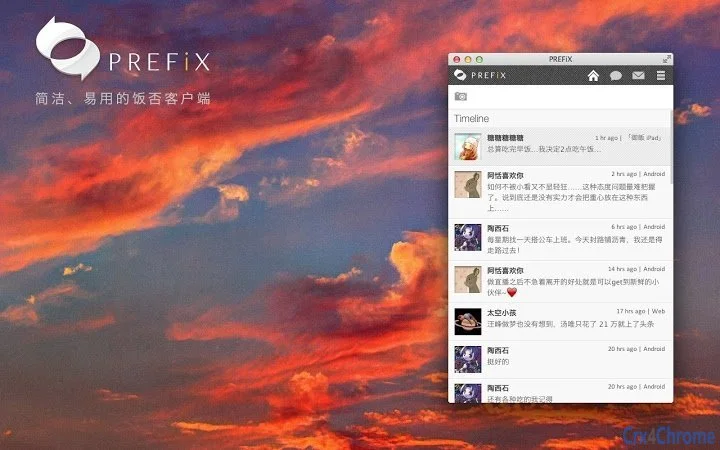

Elegant Social Media Desktop Client
Temiz, duyarlı bir arayüzü değer veren sosyal medya meraklıları ve profesyonelleri için tasarlanmış bu masaüstü uygulama, sosyal etkileşimleri yönetmek için akıcı bir deneyim sunar. Açık kaynaklı Ripple temeli üzerine inşa edilmiş ve modern özelliklerle geliştirilmiş olan bu yazılım, tarayıcı tabanlı platformlara rafine bir alternatif sağlar. Kullanıcılar zaman çizelgelerini izleyebilir, gerçek zamanlı bildirimler alabilir ve içeriğe verimli bir şekilde etkileşimde bulunabilir—hepsi hafif, görsel olarak çekici bir ortam içinde. Sürekli sosyal etkileşime güvenen bireyler, örneğin içerik oluşturucular, topluluk yöneticileri ve aktif ağ kurucular için idealdir; gerçek zamanlı güncellemeler ve sorunsuz içerik paylaşımını destekler. Otomatik bağlantı sıkıştırma, çoklu yöntemlerle resim yükleme ve Vim tarzı klavye kısayolları gibi özelliklerin entegrasyonu üretkenliği artırır. Akıllı filtreleme ve bağlam‑duyarlı mesaj ön izlemeleri, kullanıcıların dikkat dağıtmadan bilgi sahibi kalmasına yardımcı olur. Uygulamanın tasarımı kullanılabilirlik ve performansa öncelik verir, bu da hem sıradan hem de sık kullanıcılar için uygundur.
Key Features & Capabilities
- Sleek, Retina-Optimized UI – Arayüz, netlik ve görsel hassasiyetle tasarlanmıştır; yüksek çözünürlüklü ekranlarda keskin render sağlar. Bu, metin ve simgelerin kolay okunmasını ve özellikle modern Mac ve Windows cihazlarda genel kullanıcı deneyiminin artmasını sağlar.
- Real-Time Streaming API Integration – Zaman çizelgeleri, bahsedenler ve doğrudan mesajlar için canlı güncellemeler sunar. Kullanıcılar anlık masaüstü bildirimleri alır, böylece önemli etkileşimleri asla kaçırmaz.
- Smart Link Compression – Uzun URL’leri otomatik olarak kısaltarak okunabilirliği artırır ve gönderilerdeki dağınıklığı azaltır, içerik paylaşımını kolaylaştırır.
- Flexible Image Uploads – Panoya entegrasyon, sürükle‑bırak veya dosya seçimi yoluyla resim yüklemeyi destekler; içerik paylaşımını hızlı ve sezgisel hâle getirir.
- Vim-Style Keyboard Navigation – Klavye kısayolları ile uygulama üzerinde tam kontrol sağlar; hız ve verimlilik arayan güç kullanıcılar için idealdir.
- Automatic Message Filtering – Gelen içeriği gürültüden arındırarak düzenler; kullanıcıların ilgili güncellemeler ve sohbetlere odaklanmasını sağlar.
- Auto-Expand Short Links & Preview Images – Kısaltılmış URL’leri anında çözer ve üçüncü‑taraf sağlayıcıların içerik ön izlemelerini gösterir; bağlam ve şeffaflığı artırır.
- 30-Second Auto-Refresh – Zaman çizelgeleri ve okunmamış mesaj sayısını her 30 saniyede bir günceller; kullanıcıların manuel müdahale olmadan güncel kalmasını sağlar.
- Customizable Post Formatting – Kullanıcıların kendi yönlendirme mesaj şablonlarını tanımlamasına izin verir; paylaşılan içerik üzerinde daha fazla kontrol sunar.
- Timeline & Message Persistence – Okuma konumlarını hatırlar ve mesaj bağlamını gösterir; kullanıcıların bıraktıkları yerden devam etmelerini mümkün kılar.
User Interface, Workflow & Performance
The application features a minimalist, intuitive interface designed for efficient navigation. The layout emphasizes content clarity with smooth scrolling and responsive interactions. Users can access timelines and send messages directly from the address bar, reducing steps and enhancing workflow speed. The inclusion of Vim-style keyboard shortcuts supports rapid navigation and action execution, particularly beneficial for users accustomed to command-line workflows. The app maintains a lightweight footprint, with a reported size of 12.5 MB, suggesting efficient resource usage. However, exact performance details such as CPU or RAM behavior were not specified. Stability is assumed to be consistent given the app’s foundation in a mature open-source project. The developer did not provide additional system requirements or performance benchmarks. General software behavior patterns suggest reliable operation under normal usage conditions. The combination of real-time updates and visual feedback—such as notification badges and audio cues—supports continuous engagement without overwhelming the user.Compatibility & System Requirements
The software is compatible with both Windows and Mac operating systems, supporting desktop environments across these platforms. It is available in version 1.2.3 and has an installation size of 12.5 MB. The developer did not specify exact system requirements, including minimum hardware specifications or memory needs. Platform compatibility information is limited to the operating systems listed. No additional details about supported screen resolutions, processor types, or graphics capabilities were provided. Users should ensure their system meets general requirements for running desktop applications. The app is designed to run as a standalone window, which may affect multitasking performance depending on system configuration. No information was shared about compatibility with virtual machines, remote desktop sessions, or low-end hardware.Pros and Cons
- Lightweight design with minimal resource usage
- Retina display optimization for sharp visuals
- Real-time notifications via Streaming API
- Multiple image upload methods for convenience
- Powerful keyboard-driven workflow with Vim-style shortcuts
- Automatic link compression and smart previews
- Customizable message formatting and filtering
- Open-source foundation with community support
- No official documentation or user guide provided
- Exact system requirements not specified
- Performance under heavy load not tested or reported
- Limited visual customization options
- Depends on external service availability for core functionality
FAQ Section
Is this software compatible with Windows and Mac?
Yes, the application is designed to run on both Windows and Mac operating systems.
Is the software free to use?
Yes, the software is available at no cost. It is distributed under an open-source license.
Does it require an internet connection?
Yes, the application relies on real-time data from external services, so an active internet connection is required for full functionality.
How often does it refresh the timeline?
The app automatically refreshes the timeline and checks for unread mentions and messages every 30 seconds.
Can I use keyboard shortcuts to navigate the app?
Yes, the app supports Vim-style keyboard shortcuts for full control over navigation and actions.







